
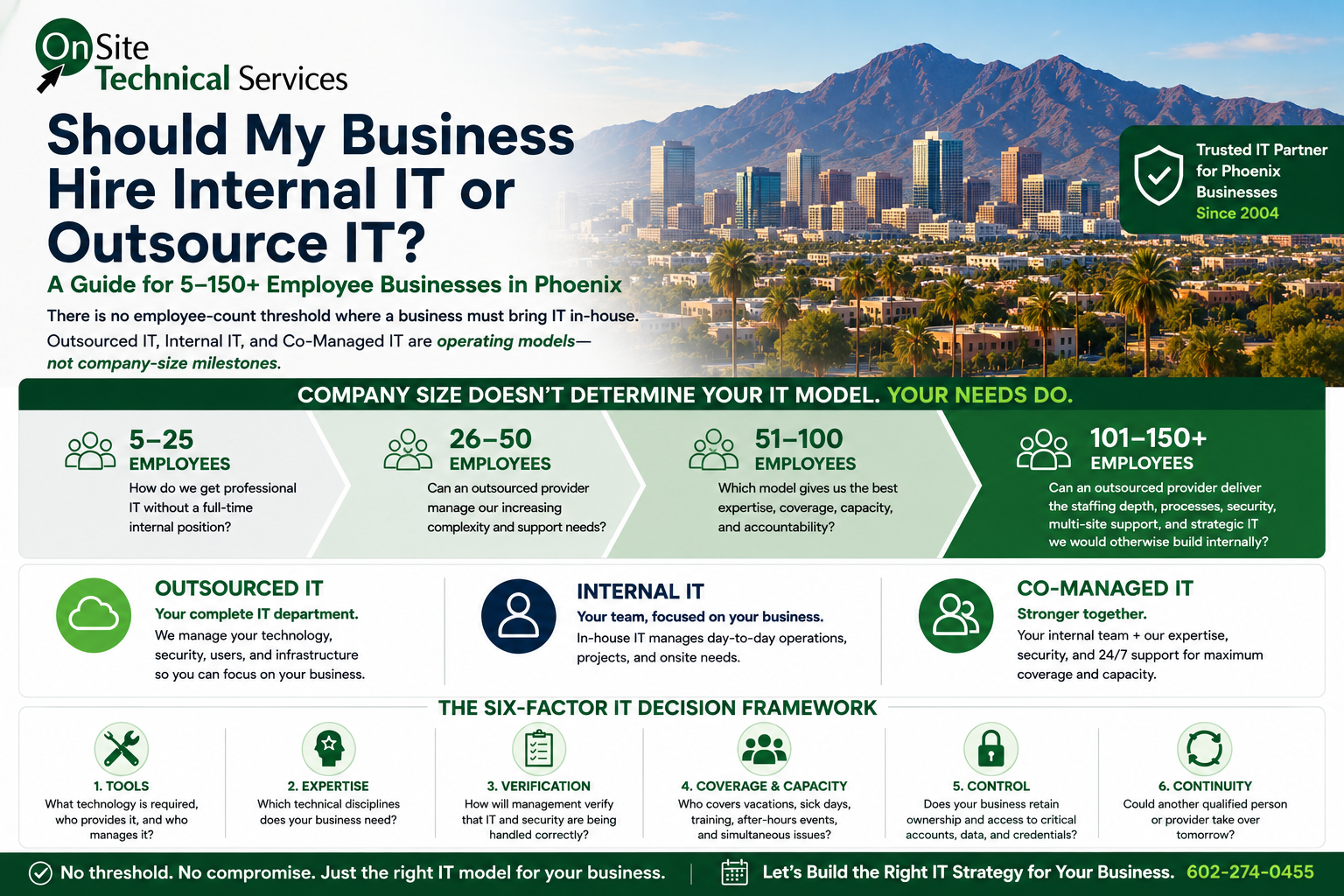
For a 5–150+ employee Phoenix business, deciding whether to hire internal IT or outsource IT should not be based on an arbitrary employee-count threshold.
A five-person office can depend heavily on Microsoft 365, cybersecurity, backups, cloud applications, computers, and internet connectivity without needing a full-time IT employee.
A 125-person organization may have substantially more users, locations, applications, infrastructure, and support requirements—and still successfully outsource its entire IT operation.
OnSite Technical Services has supported organizations with more than 100 users as their complete outsourced IT department, including a 250-person organization operating across 12 locations without internal IT staff.
So the question isn't:
“At what employee count do we need to hire IT?”
The better question is:
Which IT operating model gives our business the expertise, tools, capacity, coverage, security, control, and accountability it needs?
To answer that, evaluate six factors:
Tools → Expertise → Verification → Coverage & Capacity → Control → Continuity
1. Employee Count Does Not Determine Your IT Model
There is no universal rule that says:
5 employees = outsourced IT
75 employees = internal IT
150 employees = internal IT department
Real environments don't work that way.
Two companies with 100 employees can have completely different technology requirements.
A manufacturer may operate multiple facilities with production systems, specialized applications, segmented networks, compliance requirements, wireless infrastructure, vendors, and onsite equipment.
A professional-services organization with the same number of employees might operate primarily through Microsoft 365 and cloud applications.
Employee count matters because more employees generally create more endpoints, accounts, permissions, applications, support requests, and security exposure.
But headcount alone doesn't determine who should manage them.
| Company Size | Better IT Question |
|---|---|
| 5–25 employees | How do we get professional IT capability without creating a full-time internal position? |
| 26–50 employees | Can an outsourced provider manage our increasing security, support, applications, and technology complexity? |
| 51–100 employees | Which model gives us the best expertise, coverage, capacity, and accountability? |
| 101–150+ employees | Can an outsourced provider deliver the staffing depth, processes, security, multi-site support, and strategic capability we would otherwise build internally? |
Outsourced IT, internal IT, and co-managed IT are operating models—not employee-count milestones.
2. A 5-Person Business Can Need Professional IT
Consider a five-person Phoenix professional office.
It might have:
- 5 employees
- 5–10 computers and mobile devices
- Microsoft 365
- Business email
- Cloud applications
- Customer or patient information
- Cybersecurity requirements
- Computer and Microsoft 365 backups
- Firewall and wireless infrastructure
- Printers and other office technology
A properly managed five-person office should not require 40 hours of IT support every week.
Most weeks, employees should be working—not waiting for someone to repair technology.
But that doesn't mean the business doesn't need professional IT management.
Someone still needs to:
- Maintain and secure computers
- Administer Microsoft 365
- Onboard and offboard employees
- Apply and verify patches
- Monitor backups
- Manage cybersecurity protections
- Investigate security alerts
- Resolve user problems
- Coordinate technology vendors
- Maintain documentation
- Plan equipment replacement
The goal of managed IT isn't to create 40 hours of IT work. It's to keep a five-person business from needing 40 hours of IT work.
3. A 100+ Employee Business Can Still Fully Outsource IT
A business does not automatically need an internal IT department because it reaches 100, 150, or even 250 employees.
A larger organization certainly requires more IT capacity.
It may have:
- Hundreds of endpoints
- Multiple locations
- More support requests
- More Microsoft 365 accounts
- More complex permissions
- Multiple networks
- More vendors
- Line-of-business applications
- Greater cybersecurity exposure
- Larger projects
- More onboarding and offboarding
- More demanding documentation requirements
But those requirements describe the IT function the organization needs.
They don't dictate whether the people performing that function must be employees.
A mature MSP can serve as the organization's complete IT department if it has the resources and processes necessary to deliver:
- Helpdesk support
- Microsoft 365 administration
- Endpoint management
- Cybersecurity monitoring
- Incident response
- Backup oversight
- Network management
- Vendor coordination
- Documentation
- Projects
- Escalation
- Strategic IT planning
- Multi-site support
- Business continuity
A Real-World Example
OnSite Technical Services has served as the outsourced IT resource for organizations with more than 100 users.
That experience has included supporting a 250-person organization across 12 different locations without an internal IT department.
The question isn't whether a company has become “too big” for outsourced IT. The question is whether the IT provider has the capacity, expertise, processes, and accountability to support an organization of that size and complexity.
4. Hiring an IT Employee Doesn't Automatically Provide the IT Tools
One of the easiest costs to overlook when considering internal IT is the technology the IT person needs to do the job.
Hiring an employee doesn't automatically provide:
| IT Capability | Comes With the Employee? |
|---|---|
| Endpoint monitoring and management | No |
| Operating system and application patching tools | No |
| Endpoint Detection and Response (EDR) | No |
| Managed Detection and Response (MDR) | No |
| Identity threat detection | No |
| Advanced email protection | No |
| Computer backup | No |
| Microsoft 365 backup | No |
| Security awareness training | No |
| SIEM/security monitoring | No |
| Remote-support platform | No |
| IT documentation system | No |
| Credential/password management | No |
| Network monitoring | No |
Buying the products is only the first step.
Someone still has to:
Select → Configure → Monitor → Maintain → Respond → Document
Buying EDR doesn't guarantee security alerts are investigated.
Buying backup software doesn't prove data can actually be restored.
Turning on MFA doesn't necessarily mean identity security has been configured appropriately.
Hiring an IT employee and building a complete IT function are not the same thing.
5. One IT Person Cannot Be Every IT Specialty
“IT” isn't one skill.
An organization may need expertise in:
- Helpdesk support
- Microsoft 365 administration
- Identity and access management
- Cybersecurity
- Endpoint security
- Backup and disaster recovery
- Networking
- Firewalls and wireless
- Cloud applications
- Email security
- Vendor management
- Compliance
- Incident response
- Strategic IT planning
A talented IT professional may be capable in many of these areas.
But one person still has one set of experiences, one schedule, and a limited amount of time.
Internal IT Has an Important Advantage
A good internal IT employee can develop extensive knowledge of the company's employees, applications, workflows, equipment, processes, culture, and business priorities.
Outsourced IT Has a Different Advantage
A capable MSP can provide access to multiple people with different specialties.
A helpdesk problem doesn't necessarily need to consume the time of a senior engineer.
A difficult Microsoft 365 issue can be escalated.
A network problem can go to someone with deeper networking experience.
A cybersecurity event can involve security specialists.
The correct question is:
Which model gives us access to the expertise our business actually needs?
6. How Does Management Know Whether the IT Is Being Done Correctly?
This is an important management question.
The person hiring the first IT employee may be an owner, controller, operations manager, HR manager, or executive.
That person may understand the business extremely well.
But how do they determine whether an IT candidate truly understands Microsoft 365, cybersecurity, networking, backup, and identity management—or simply knows the terminology?
Management Needs Verifiable Outcomes
Management should be able to determine:
- Are backups successful?
- Have restores actually been tested?
- Is MFA properly implemented?
- Are Microsoft 365 security policies configured appropriately?
- Are administrator privileges controlled?
- Are former employees completely removed?
- Are security alerts investigated?
- Are computers and applications patched?
- Is endpoint security properly configured?
- Is the firewall configured appropriately?
- Are administrative credentials secured?
- Are important changes documented?
- Could another qualified professional understand the environment?
If every answer depends on:
“Our IT person says it's handled.”
management has very little independent verification.
That doesn't mean the employee is dishonest or incompetent.
It means the company has a governance gap.
Good IT governance doesn't eliminate trust. It makes critical technology responsibilities independently verifiable.
7. Vacation, Sick Days, Training, and Education Are Part of IT Capacity
A highly capable IT employee is still one person.
That person needs:
- Vacation
- Holidays
- Sick days
- Personal time
- Training
- Certification
- Continuing education
- Time for projects
- Time to research new technologies
- Time for proactive maintenance
These aren't weaknesses.
Training and continuing education are essential.
Microsoft 365 changes. Cybersecurity threats change. New vulnerabilities appear. Applications change. Networks change. Security products change.
But Who Handles IT During Training?
Suppose the IT employee attends a two-day cybersecurity course.
That's beneficial to the company.
But who handles IT during those two days?
Now suppose that person takes a one-week vacation.
During that week:
- A new employee starts
- A computer fails
- A Microsoft 365 account becomes locked
- A backup generates an alert
- An internet problem occurs
- Suspicious account activity is detected
Who handles it?
Continuing education is part of maintaining a capable IT function. The business simply needs coverage while that education occurs.
8. Good IT Should Reduce Reactive IT Work
A properly managed environment should reduce unnecessary reactive work through:
- Monitoring
- Patching
- Standardization
- Automation
- Documentation
- Preventive maintenance
- Security controls
- Lifecycle planning
There is still legitimate proactive IT work:
- Technology projects
- Automation
- Security improvements
- Application improvements
- Vendor management
- Infrastructure planning
- User education
- Strategic planning
Good IT should reduce the amount of reactive IT work a business experiences—not justify itself by keeping someone constantly busy fixing problems.
9. Don't Allow One Person to Control the Entire Environment
Businesses understand the danger of a single point of failure in technology.
People can become single points of failure too.
Over time, one IT person can become the only individual who knows:
- Microsoft 365 administrator credentials
- Domain and DNS access
- Firewall credentials
- Network configurations
- Backup systems
- Security platforms
- Vendor contacts
- Software licensing
- Cloud applications
- Server configurations
- Administrative passwords
- Why systems were configured a particular way
This can happen with an excellent, loyal employee.
The problem becomes visible when that person leaves or becomes unavailable.
Use This 5-Step Control Framework
Ownership → Documentation → Access → Oversight → Continuity
Ownership: Domains, Microsoft 365 tenants, licensing, subscriptions, vendor relationships, and critical accounts should ultimately belong to the business.
Documentation: Networks, systems, vendors, configurations, recovery procedures, and important dependencies should be documented.
Access: The company should maintain controlled emergency access to critical administrative credentials.
Oversight: Important technology and cybersecurity decisions should be capable of independent review.
Continuity: Another qualified person or provider should be able to take over if the primary IT resource becomes unavailable.
Your business—not an employee and not an MSP—should ultimately retain ownership and governance of its technology.
10. Cybersecurity Requires More Than Installing Security Products
Cybersecurity is an ongoing management process.
Employees join and leave. Permissions change. Computers are replaced. Applications are added. Microsoft 365 changes. New vulnerabilities are discovered. Attack techniques evolve. Configurations drift.
Monitor → Identify Gaps → Adjust Controls → Respond
Monitor: Who monitors endpoints, identities, backups, security alerts, and critical systems?
Identify Gaps: Who identifies inappropriate permissions, outdated configurations, unprotected devices, and emerging weaknesses?
Adjust Controls: Who fixes those gaps and verifies that the changes worked?
Respond: Who investigates and responds when an actual security event occurs?
An internal employee can own these responsibilities.
An MSP can own them.
Or internal IT and an MSP can divide them.
What matters is that management knows who owns each responsibility.
11. Compare Coverage and Capacity
One IT employee provides one person's capacity.
Consider a normal day:
9:00 a.m. — an employee can't access email.
10:00 a.m. — a new employee needs onboarding.
Noon — a network problem occurs.
2:00 p.m. — a cybersecurity alert needs investigation.
Meanwhile, backups need review, patches need monitoring, vendors need assistance, and a project deadline is approaching.
Someone has to prioritize.
Businesses should ask:
- Who handles simultaneous problems?
- Who provides escalation?
- Who handles vacations?
- Who covers illness?
- Who handles IT during training?
- Who receives after-hours security alerts?
- Who investigates those alerts?
- Who handles projects when daily support is busy?
- Who provides expertise outside the primary person's skill set?
Coverage and capacity should be designed—not assumed.
12. When Does Fully Outsourced IT Make Sense?
Fully outsourced IT may make sense when an organization wants an outside provider to take responsibility for most or all of the IT function.
That can include companies with 5 employees, 50 employees, 150 employees, or more.
The important question is whether the provider can deliver the required capabilities.
Look for:
- Appropriate staffing
- Helpdesk capacity
- Escalation paths
- Cybersecurity expertise
- Microsoft 365 expertise
- Network expertise
- Documentation
- Monitoring
- Backup oversight
- Incident response
- Vendor management
- Project capability
- Strategic planning
- Multi-site support when required
- Business continuity
The provider should be capable of functioning as an IT department, not simply a company that fixes computers when something breaks.
Learn more about Managed IT Services from OnSite Technical Services.
13. When Does Internal IT Make Sense?
Internal IT can be an excellent model when an organization wants technology expertise embedded directly in the business.
It may make sense when there is substantial need for:
- Daily onsite involvement
- Specialized business applications
- Internal technology projects
- Business-process development
- Technology leadership
- Close interaction with departments
- Application ownership
- Dedicated technology resources
But hiring internal IT doesn't eliminate the need to consider tools, cybersecurity, training, coverage, specialized expertise, verification, documentation, and continuity.
Internal IT should be selected because it fits the organization's operating model—not simply because the company reached an arbitrary number of employees.
14. When Does Co-Managed IT Make Sense?
An organization may have capable internal IT and still partner with an MSP.
This is often called co-managed IT.
Internal IT might focus on:
- Business applications
- Employee relationships
- Internal projects
- Business processes
- Onsite technology
- Strategic initiatives
The MSP might provide:
- Cybersecurity
- 24/7 monitoring
- Helpdesk overflow
- Escalation
- Microsoft 365 expertise
- Network expertise
- Projects
- Vacation coverage
- Additional staffing
- Independent technical review
Co-managed IT isn't necessarily a stepping stone between outsourced and internal IT.
It is simply another operating model.
15. Use This 6-Factor Framework Before You Decide
1. Tools
What technology is required to manage, secure, monitor, support, and back up the business?
Who provides it? Who manages it?
2. Expertise
Which technical disciplines does the organization need?
Does the proposed model provide access to them?
3. Verification
How will management verify that backups, cybersecurity, access, patching, documentation, and configurations are actually being managed correctly?
4. Coverage & Capacity
Who covers vacation, sick days, training, continuing education, after-hours events, simultaneous problems, major projects, and specialized issues?
5. Control
Does the business retain appropriate ownership and access to accounts, data, credentials, documentation, domains, licensing, and vendor relationships?
6. Continuity
Could another qualified person or provider take over tomorrow if necessary?
If management cannot confidently answer these six questions, it has identified an IT risk that should be addressed—regardless of whether IT is internal, outsourced, or co-managed.
Don't Compare an IT Employee With an MSP Invoice
The decision isn't simply:
Employee vs. MSP monthly fee.
Compare the complete IT function:
Tools + Expertise + Verification + Coverage & Capacity + Control + Continuity
A five-person business may be best served by fully outsourced IT.
A 75-person business may also be best served by fully outsourced IT.
A 150-person organization may choose internal IT.
Another 150-person organization may remain completely outsourced.
A third may choose co-managed IT.
None of those models is automatically right or wrong because of employee count.
The question is whether the chosen model provides the capabilities the organization actually needs.
Frequently Asked Questions
Is a 5-person company too small for Managed IT Services?
No. A five-person company may depend heavily on Microsoft 365, cloud applications, computers, customer data, cybersecurity, backups, and internet connectivity. It can need professional IT management without needing a full-time IT employee.
Does a 25-person company need an internal IT person?
Not necessarily. A properly managed 25-person environment should not require one person to spend 40 hours every week reacting to IT problems. Evaluate technology complexity, cybersecurity, onsite requirements, projects, and support needs instead of relying solely on headcount.
Does a 100-person company need an internal IT department?
No. A 100-person organization can operate successfully with fully outsourced IT if its provider has sufficient staffing, expertise, processes, security capabilities, documentation, and support capacity.
Can a 150-person company fully outsource IT?
Yes. There is no universal employee threshold that requires internal IT. The organization should evaluate whether its provider can support its technology complexity, locations, users, cybersecurity requirements, projects, applications, and service expectations.
Can an MSP support multiple business locations without internal IT?
Yes, provided the MSP has the appropriate remote-management capabilities, network expertise, documentation, support processes, staffing, and onsite service model. OnSite Technical Services has supported a 250-person organization operating across 12 locations without internal IT staff.
Does hiring an IT employee include cybersecurity tools?
No. The employee provides time and expertise. The organization still needs appropriate cybersecurity, backup, monitoring, management, documentation, and support technologies.
Who handles IT when an internal IT person is on vacation?
The company should establish coverage before the vacation occurs. Coverage can come from another qualified internal resource or an outside provider such as an MSP.
Does an IT employee need ongoing training?
Yes. Microsoft 365, cybersecurity threats, vulnerabilities, applications, networking, operating systems, and security products continually change. Continuing education is part of maintaining an effective IT function.
How can management verify that IT is being handled correctly?
Use documentation, backup restoration testing, access reviews, security reporting, patching reports, company-controlled accounts, change documentation, and periodic independent technical reviews.
Can an MSP create the same dependency problem as an internal IT person?
Yes. Outsourcing doesn't eliminate the need for governance. The business should retain appropriate ownership and control of its accounts, data, credentials, documentation, domains, and technology relationships.
What is co-managed IT?
Co-managed IT combines internal IT resources with an MSP. Responsibilities are divided according to the organization's needs rather than assuming either party must handle everything.
Internal IT vs. Outsourced IT: The Bottom Line
There is no employee-count threshold where a company automatically needs to bring IT in-house.
A five-person company can rely completely on an MSP.
So can a 50-person company.
So can a 150-person organization.
And with the right operating model and provider capabilities, organizations larger than that can as well.
OnSite Technical Services has experience serving as the complete outsourced IT resource for organizations with more than 100 users, including supporting a 250-person organization across 12 locations without internal IT staff.
The decision should start with:
What does our complete IT function need to accomplish?
Then evaluate:
Tools → Expertise → Verification → Coverage & Capacity → Control → Continuity
The answer may be fully outsourced IT, internal IT, or co-managed IT.
What matters is that the organization has the expertise, tools, security, coverage, documentation, control, capacity, and accountability it needs.
OnSite Technical Services has provided Greater Phoenix businesses with IT planning, support, and protection since 2004.
Contact OnSite Technical Services to schedule a consultation.
Related:
Managed IT Services Cost in Phoenix: 2026 Pricing Guide